All Blogs

Compile a specific changeset with Team Build 2010 (TFS)

Jun 09, 2012 1 min read

By default the Team Foundation Server 2010’s build engine pulls the latest version of the code when you queue a build with any build definition. However it is very easy to override this and specify what changeset or label you want to compile instead of the latest version. To achieve this queue a build definition as you would normally. On the dialogue that props up find the “Get Version” property under Advanced section on the “Parameters” tab as shown below
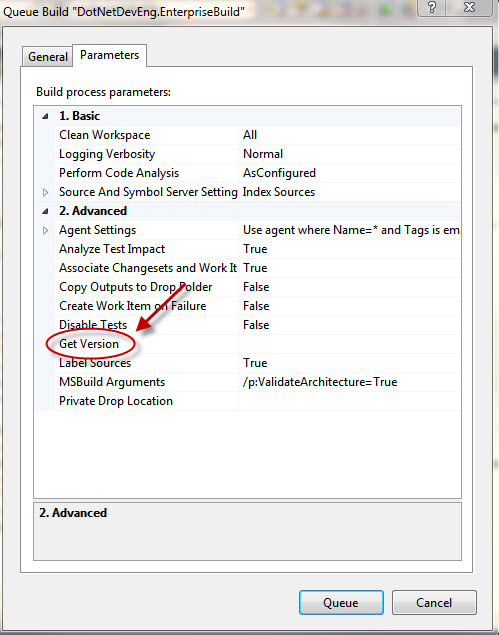
 

Specify particular changeset to use with team build 2010


In here you can specify the same TFS changeset that was used to build your build in step 2. Assuming this changeset is number 84, you would write (exactly)

C84

if you compile labels then for a label named – “For build xyz” you specify

LFor build xyz

Note that “C” and “L” above are intentional.

That’s it!

Explore Our Latest Articles

Default Image
23 Apr 2026 3 min read

Introduction Almo is a Microsoft AppSource Outlook add-in. Before users in your organisation can sign in, an IT Administrator needs…

Default Image
23 Apr 2026 2 min read

Thank you for your interest in Almo! We are so excited to have you onboard 🤩 When you sign in…

31 Jul 2023 6 min read

In today’s fast-paced software development landscape, having the right set of tools can make all the difference in delivering high-quality…

Save up to 70 Minutes Daily

Integrate Azure DevOps Service and Microsoft Outlook

Almo accelerates productivity by bringing work item creation and modification experience within Microsoft Outlook. Now create a new work item, link it to an existing Outlook email and fetch its latest state from Azure DevOps Service with our single-click Microsoft addin.