

Thank you for your interest in Almo! We are so excited to have you onboard 🤩
When you sign in to Almo for the first time, Microsoft may show an “Approval required” screen.
This is a standard Microsoft security requirement that applies to any add-in requesting organisation-level permissions in Microsoft Entra (formerly Azure Active Directory).
Your IT administrator needs to grant consent once – after that, everyone in your organisation can use Almo without any further steps.
The process has two parts: what we need you to do, and what your IT administrator does.
What We Need You to Do
When you see the screen below after clicking Sign in with Microsoft, type a brief reason in the text box and click Request approval.
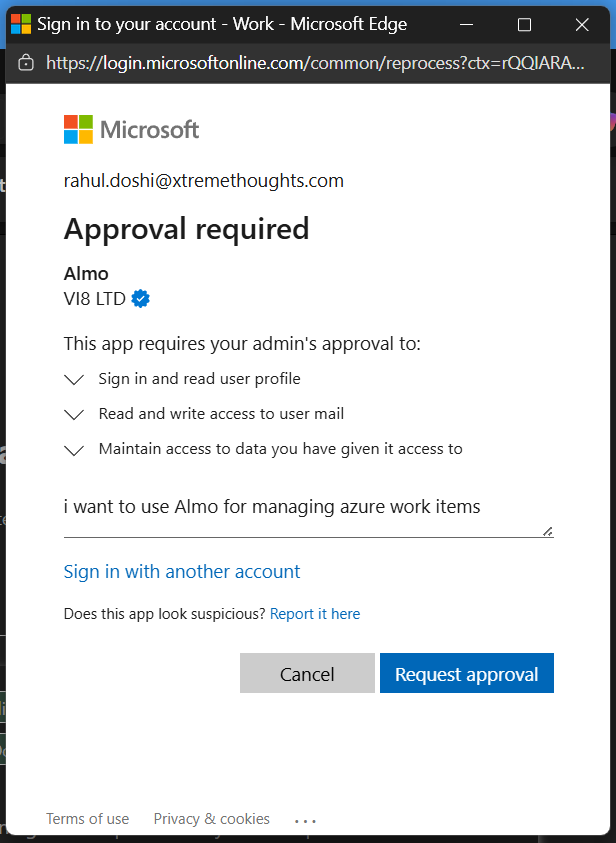
A brief explanation such as “I want to use Almo to manage Azure DevOps work items from Outlook” should be enough.
Microsoft will notify your IT administrator automatically.
You will then see this confirmation:
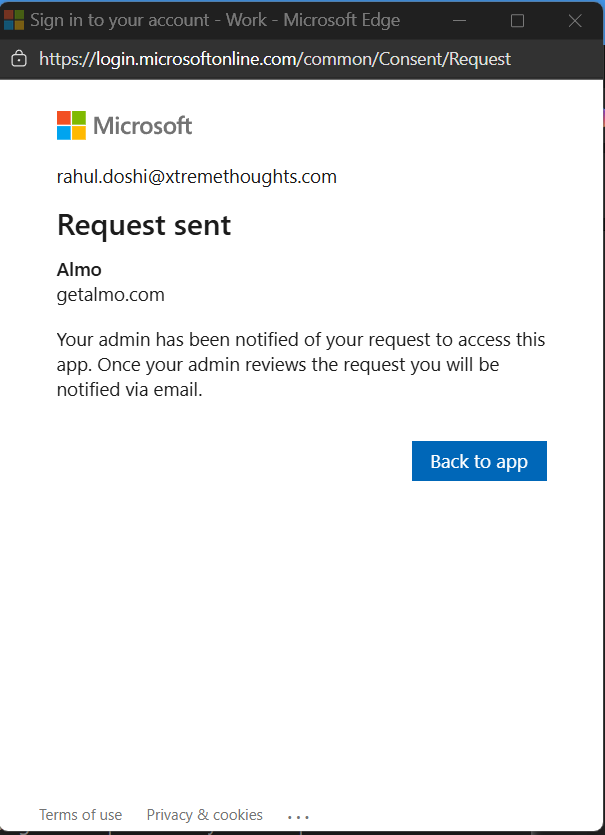
At this point, please forward the page at this link https://getalmo.com/blog/entra-setup to your IT administrator and ask them to follow the instructions below.
The setup takes about five minutes on their end. Once they complete it, you can sign in and start using Almo straight away.

