Category: Uncategorized

  • Compile a specific changeset with Team Build 2010 (TFS)

    Compile a specific changeset with Team Build 2010 (TFS)

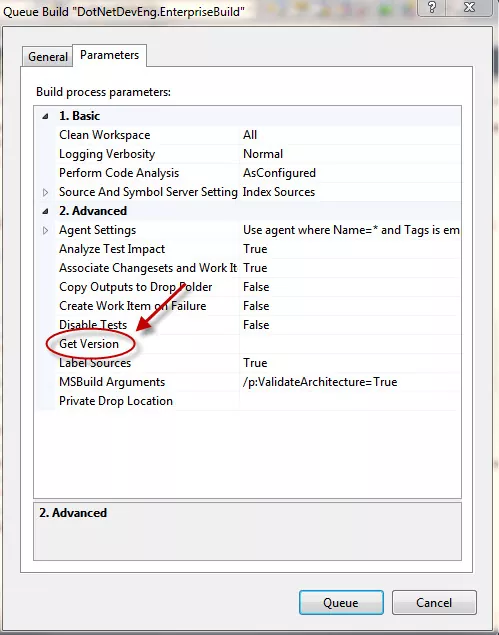
    By default the Team Foundation Server 2010’s build engine pulls the latest version of the code when you queue a build with any build definition. However it is very easy to override this and specify what changeset or label you want to compile instead of the latest version. To achieve this queue a build definition as you would normally. On the dialogue that props up find the “Get Version” property under Advanced section on the “Parameters” tab as shown below


    Specify particular changeset to use with team build 2010
    Specify particular changeset to use with team build 2010


    In here you can specify the same TFS changeset that was used to build your build in step 2. Assuming this changeset is number 84, you would write (exactly)

    C84

    if you compile labels then for a label named – “For build xyz” you specify

    LFor build xyz

    Note that “C” and “L” above are intentional.

    That’s it!